Updates
Changelog
New updates, fixes, and improvements.
V2.19
Setup photos
You can now add photos to each TotaLite device during setup, so your installation context is visible directly in the platform.

When you install a device, the app asks for three photos:
The asset being monitored
The sensor's field of view
The sensor’s installation context
Photos in the platform. Your setup photos appear alongside each device, so you and your team see the real asset instead of a placeholder image.
Why it matters
Faster support. Our support team can see how and where a device is installed straight away, so we can troubleshoot issues faster, often without a site visit.
A clearer view of your project. Real site imagery makes it easier to find and recognise devices across your project.
Please note
The photo step is required to complete a new installation.
V2.19
Promote users to admin
Admin users can now promote other users to admin, giving them access to all parts of the platform.

Promote to admin. Any admin can give admin rights to another user on their account.
Full platform access. Promoted users get the same access as existing admins, across every part of the platform.
Receive alert emails. Start receiving emails for any alert triggered in their projects.
Why it matters
Share the workload. More than one person can manage users, devices and settings, and react to alerts so tasks don't wait on a single admin.
Easier handovers. When a project changes hands, the new lead can be given full access straight away.
Please note
Admin access covers the whole platform, so only give it to people who need it.
Admins can also remove admin rights. Changes are not logged.
V2.19
Local connectivity switching
Using the app, you can now switch a TotaLite device's connectivity between LTE and Ethernet on site, using a phone connected directly to the device.

Switch connectivity locally. Change a device's connection between LTE and Ethernet on site, without contacting support.
Firmware updates over any connection. Devices can receive firmware updates over the connection that works best on your site.
Why it matters
Keep monitoring in low-connectivity areas. In tunnels, underground structures and other sites with weak or no cellular signal, you can use Ethernet where it's available.
Adapt to local infrastructure. Choose the connection that suits each site and region.
How to use it
Stand nearby the TotaLite that requires a connectivity switch.
Open the mobile app and select your device.
Scroll down to the connectivity section and tap the Switch connection mode button.
Follow the guided process.
V2.19
UI/UX improvements
Project actions in one place
Manage, share or export a project using the access buttons in the top-right corner.

Simpler device selection
Find and select any device from the new drop-down menu.
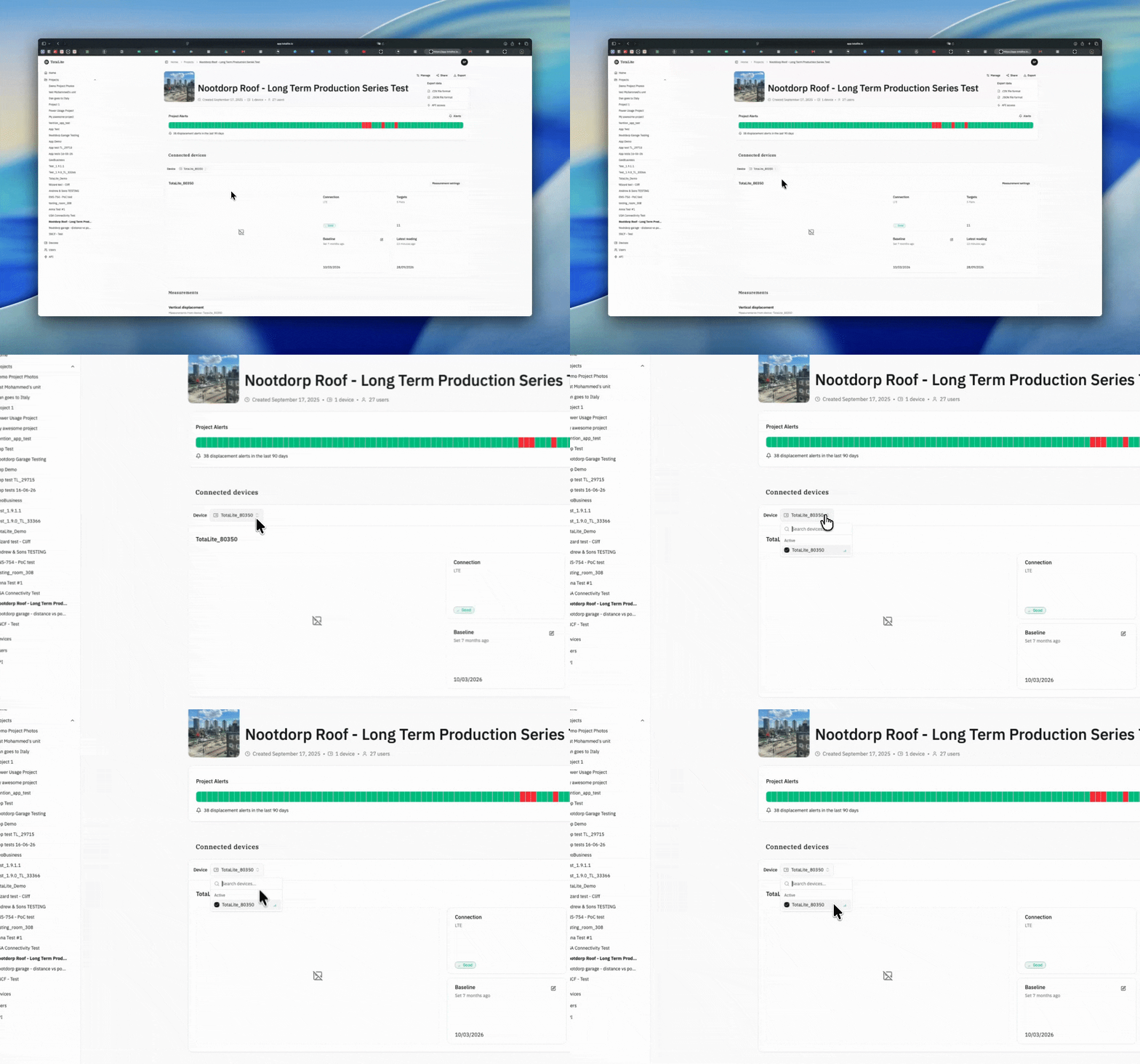
Chart controls that stay with you
When you're viewing charts, a sticky bar stays at the top of the screen. Use it to change the device, time range or chart resolution at any point, without scrolling back up.

V2.1.8
Displacement alerts
Our long awaited displacement alerts ensure you’re notified when movement has persisted beyond a threshold that you set in a few clicks. Together with our system alerts, you’ll now have full coverage on whether your equipment is working or your structure moving. System alerts flag issues with your setup: a device gone offline, or a reference target that’s gone missing, each for more than an hour. Either type can be critical depending on the situation.
Set a threshold in a few clicks
Set a displacement threshold from 1 mm to 500 mm directly from the chart. Once set, the threshold shows up visually on the chart, and a bell icon marks any target being actively monitored. Displacement alerts trigger on a time window rather than a single spike; displacement has to hold above threshold for an hour (or two consecutive readings, if your interval is longer) before you’re notified. A daily cap keeps your inbox from flooding after the first trigger.

Cleaner charts, zero scrolling
Displacement charts now auto-size to fit your data on the canvas. No more manual scrolling to see the full picture. The sidebar’s had a refresh too, with new icons and improved visualisations throughout.

See 90 days of status history at a glance
A new timeline shows asset health and alert activity over time, helping you quickly identify when something changed.

Review all displacement alerts in one place
Filter by read status, and open a displacement alert to jump directly to the relevant moment on the chart. Thresholds currently apply equally above and below the baseline. If a target stabilises at a new position, you can manually re-baseline it.

v2.1.6
Critical alerts
TotaLite now notifies you automatically when something needs attention on your project.
Two events trigger a critical alert:
A device has been offline for more than one hour
A reference target has been missing for more than one hour (or two consecutive measurements when the measurement interval exceeds one hour)
Both are classified as critical because they create displacement data gaps that cannot be recovered. When an alert fires, the organisation administrator receives an email with details and a direct link to the relevant troubleshooting steps. A dismissible banner also appears on the project page.
No action required. The feature is live and active across all projects automatically.
v2.1.5
User deletion
Admins can now remove users from their organisation directly via the API, triggered from the admin users page. Removed users lose access immediately. Note that you cannot remove yourself through this endpoint — some things require a human touch.
Under the hood, removal is handled gracefully: if the user belongs to other organisations, only the membership is revoked. If it's their last org, their account is fully deactivated. All removals are recorded in the audit log.
v2.1.5
App Updates
Improved auto LED power: We’ve tuned the power curve for the auto LED power feature, increasing the likelihood that the TotaLite picks up all targets on the first measurement. Especially useful during setup.
Unified login: The app now requires you to log in with the same account you use on the platform. The app is also scoped to your organisation: only devices that belong to your org will show up. If you’re having trouble logging in, ask your company admin to add you via the platform.
v2.1.5
Project sharing
You can now share a project with people outside your company directly from the project screen. Hit the Share Project button and they’ll get view-only access to the project data. They can see everything, but can’t change project settings or touch device configuration. If you need to give someone within your business access, just add them to the project and company as usual.
v2.1.4
New definition of inter-target distance
The ability to define target pairs - user-defined relationships between two monitoring points for measuring relative displacement - was already available. This functionality is split into three components: inter-target distance, inter-target distance (vertical component), and inter-target distance (horizontal component). It is commonly used to monitor differential movement between two points on a structure or to measure convergence in tunnels.
We have now fixed several bugs and made the direction conventions (signs) more intuitive. In the updated definition, Target 2 acts as the reference point, while Target 1 is treated as the moving target. As a result, users may observe a step change in the inter-target horizontal distance and a sign reversal in the inter-target vertical distance.
Read the full documentation on inter-target distances in the user guide: https://totalite.notion.site/totalite-get-started
v2.1.3
TotaLite API in public Beta
All our users can now use the Beta version of the TotaLite API.
Create a token (keep it secret and safe) and collect your data on a daily basis from our platform. You can find the docs and the API at this url: https://totalite-api.fly.dev/.
Use cases for the API
Blend TotaLite data with other data sources to get deeper insights or to validate TotaLite against other monitoring tech.
Connect with tooling to set automatic email alerts based on exceeding displacement thresholds. Think about automation tools, such as Zapier or n8n.
v2.1.2
Improved Data Processing of Over-Exposure
We've enhanced how the TotaLite algorithms handle over-exposed targets caused by sunlight, too much LED power or other over-exposure causes. This makes your displacement measurements more accurate and stable and allows users to have close and far away targets in the same setup.
Reduced Number of Spikes
In rare cases, TotaLite introduced errors where it was flipping between two states. This behaviour has been eliminated; thus less spikes. The time-series below shows the spikes of the past flipping behaviour in the red circled area and the line without spikes since the deployment.
Faster Data Processing
We've added smart caching to the processing pipeline. When you adjust your baseline or change settings and need to recalculate, the platform computes 10x faster by reusing previously calculated data. This means your data appears much faster after editing your baseline or tweaking project settings.
What This Means for You:
More reliable measurements in varying light conditions
Better dealing with overexposed close targets
Smoother, more consistent target tracking
Near-instant recalculation when adjusting baselines or settings
More time monitoring, less time waiting for data
We're committed to continuously improving the quality and speed of your monitoring experience. Happy monitoring!